Join during setup
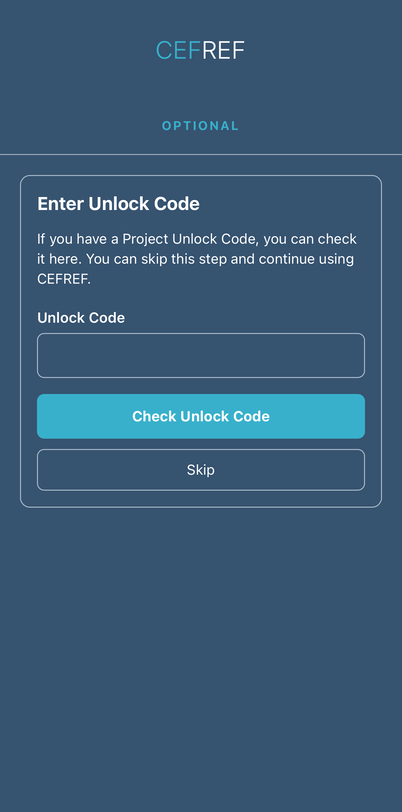
When you create a new CEFREF account, entering a Project Unlock Code is optional. Checking the code identifies the Project; it does not join you automatically.
If you have been given a Project Unlock Code, you can join using your existing CEFREF account. You can join during setup or later through Settings.
When you create a new CEFREF account, entering a Project Unlock Code is optional. Checking the code identifies the Project; it does not join you automatically.
Already using CEFREF? Open Settings → Account and choose Project (shown as No Project before joining). You can follow the same steps below.
Enter your Project Unlock Code
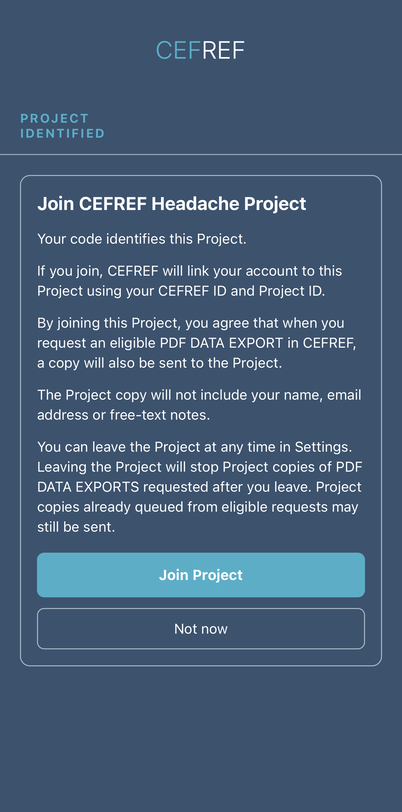
Choose whether to join
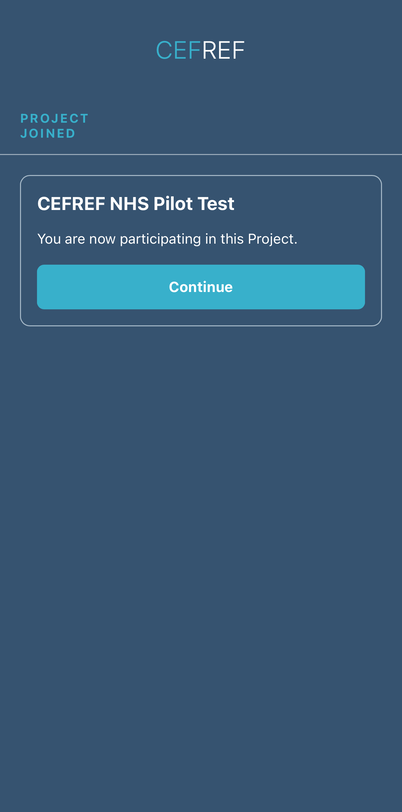
Project joined
Start recording your diary as soon as you receive your Project ID. It is important to make an entry on Day 1. If you do not have a headache on Day 1, record your headache severity as 0 (No Headache) and save the entry.
Your Project team will tell you when they would like you to export your data and which export to use. If you are asked to send a CEFREF Report, open Charts and select the “CEFREF Report” button at the bottom of the page. CSV is a separate diary-data export sent to your CEFREF account email; it is not the eligible PDF Project-copy export.
When you request an eligible PDF DATA EXPORT while participating in a Project, a copy is sent to your CEFREF account email and a copy will also be sent to the Project’s verified research email.
Your diary is available in the separate CEFREF app.
Get CEFREF