CEFREF / USER GUIDE

Settings

A clear map of the options in your CEFREF app. Open Settings from the bottom navigation to find them.

THE SETTINGS MENU

Find your way around.

The menu groups diary controls, your data, app information and account options. The guide below follows those same branches.

Explore the settings
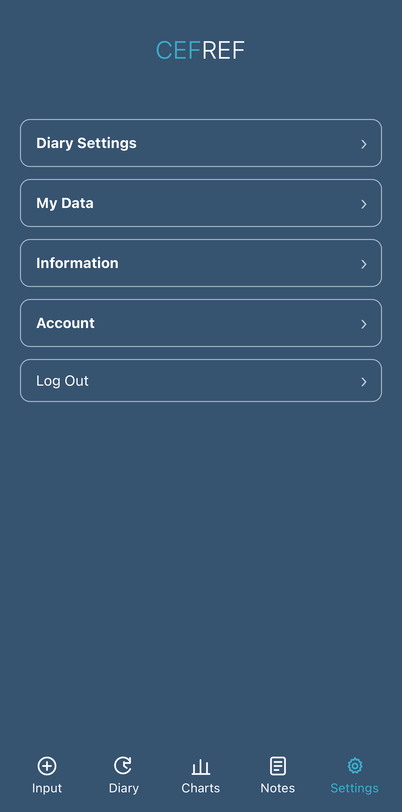
CEFREF Settings menu showing Diary Settings, My Data, Information, Account and Log Out
Settings menu in the CEFREF app

SETTINGS / AT A GLANCE

A place for everything.

Follow a category to see what you can find inside. Available options may vary by account.

Settings

Diary Settings

How your diary appears and when it reminds you.

  • Diary Display

    Controls whether Diary uses rolling 28-day periods or calendar months. This also determines which Review screens appear in Charts.

    • 28 DaysShows a 28-day Diary period ending on the selected period end date.
    • Calendar MonthShows one complete calendar month and moves between calendar months.
  • Headache Diary Reminder

    Allows you to turn the diary reminder on or off and select a reminder time.

    • Reminder: On / OffTurn the diary reminder on or off.
    • Reminder TimeChoose when you would like the reminder.

My Data

Available ways to get or remove your diary data.

  • Download My Data

    See the export options available for your account.

    • Diary DataRequest a CSV export of your diary data, sent to your CEFREF account email.
    • CEFREF ReportWhere available, request a PDF DATA EXPORT (CEFREF Report) of your diary analysis.
  • Delete My Data

    Removes diary clinical data. This is different from deleting your account.

Information

App information and policies.

  • Privacy Policy

    Read how CEFREF handles personal information.

  • Terms of Use

    Read the terms for using CEFREF.

  • About CEFREF

    Find information about the app.

Account

Your identifier, Project participation and account controls.

  • CEFREF ID

    Your CEFREF account identifier.

  • Project

    See your current Project participation or the option to join a Project. Joining is optional and separate from creating an account. How to join a Project

  • Auto Logoff

    Turn automatic logoff on or off.

  • Delete Account

    Where available, start the account-deletion process to close or delete your account. This is different from deleting diary clinical data.

Log Out

End your current CEFREF app session.

Important

CEFREF is a recording and review tool, not a diagnostic service or a substitute for medical assessment. Seek appropriate medical advice for new, severe or changing symptoms.

Ready to open CEFREF?

Your diary is available in the separate CEFREF app.

Get CEFREF